Plotting
ecgfeat.viz draws a raw signal together with the record measured from it.
It needs the optional Matplotlib dependency:
pip install "ecg-records[viz]"
import ecgfeat and import ecgfeat.viz never import Matplotlib. The plotting
functions load on first use. Without Matplotlib, that first use raises
ImportError with the installation hint. ecgfeat.viz never uses pyplot:
it builds figures through the object-oriented API, so it works in scripts,
servers and notebooks without touching global figure state.
ECG paper
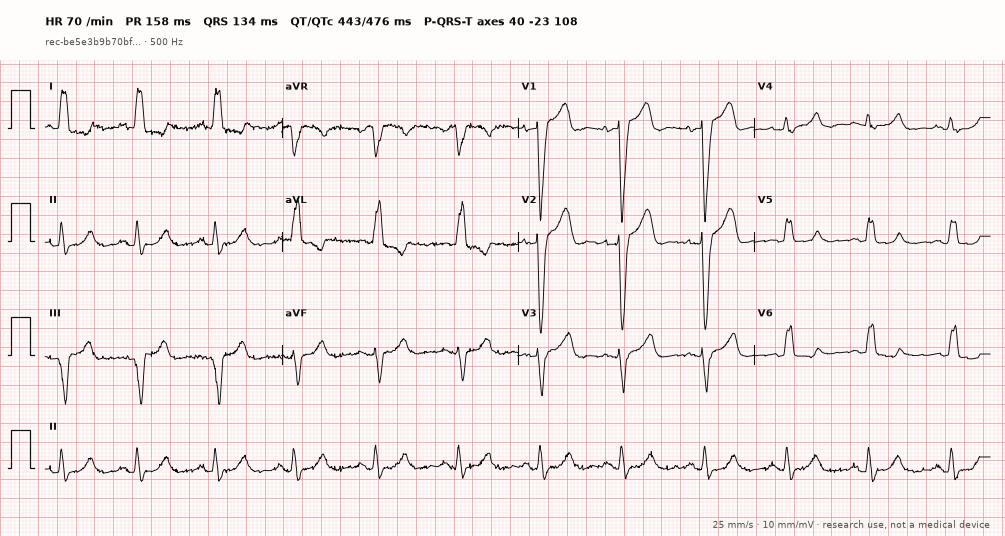
plot_ecg draws the conventional 12-lead print: four time-aligned 2.5 s
columns (I–III, aVR–aVF, V1–V3, V4–V6) and a 10 s lead II rhythm strip, with 1
mV calibration pulses on a 1 mm / 5 mm grid. A new figure is sized in real
millimetres, so printing it at 100% gives 25 mm/s and 10 mm/mV. The header
prints the record-level measurements; * marks values the record kept but
flagged as not reportable.
import matplotlib
matplotlib.use("Agg")

import ecgfeat
from ecgfeat.viz import plot_ecg

example = ecgfeat.load_example("lbbb")
paper_record = ecgfeat.ecg_record(example, profile="all")
fig, ax = plot_ecg(example, paper_record)      # layout="6x2" | "12x1", rhythm_leads=("II", "V1"), gain=5
fig.savefig("ecg.png", dpi=150)
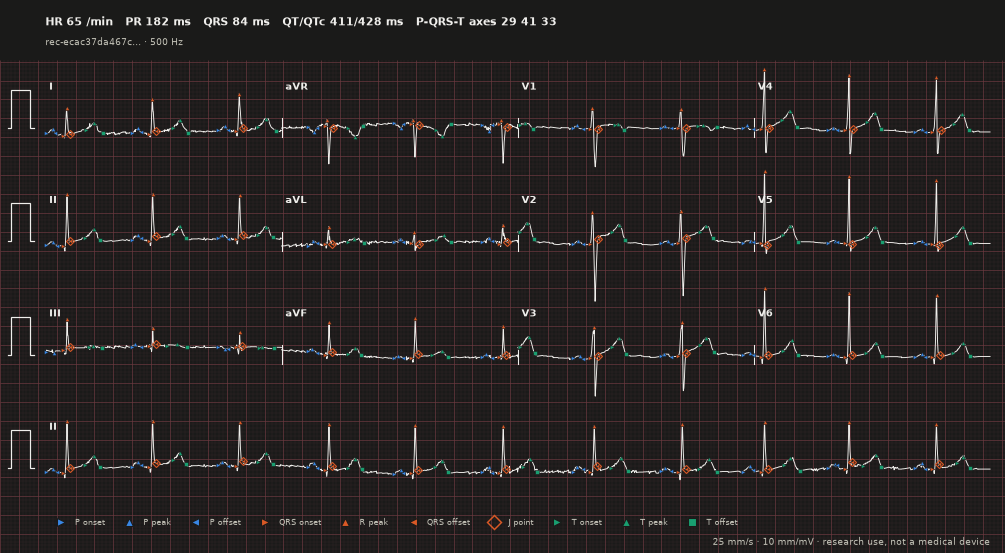
annotations="waves" adds the landmarks, style="dark" the dark theme:
Example
import matplotlib
matplotlib.use("Agg")                       # headless backend for scripts; omit in notebooks

import numpy as np
from ecgfeat import ecg_record
from ecgfeat.viz import plot_beat, plot_record

signal = np.load("ecg.npy")
leads = ["I", "II", "III", "aVR", "aVL", "aVF", "V1", "V2", "V3", "V4", "V5", "V6"]
record = ecg_record(signal, sampling_rate=500, lead_names=leads, profile="all")

fig, axes = plot_record(signal, record, leads=["II", "V1", "V5"],
                        start_s=1.0, end_s=4.0, annotations="all")
fig.savefig("record.png", dpi=150)

fig, ax = plot_beat(signal, record, beat=3, lead="II")
fig.savefig("beat.png", dpi=150)
Functions
| Function | Returns | Draws |
|---|---|---|
plot_record(signal, record, *, leads=None, start_s=None, end_s=None, annotations="waves", figure=None) |
(Figure, tuple[Axes, ...]) |
stacked leads over a time window |
plot_beat(signal, record, *, beat, lead, figure=None) |
(Figure, Axes) |
one beat on one lead, with that cell's landmarks and PR/QRS/QT in the title |
plot_beat_all_leads(signal, record, *, beat, leads=None, figure=None) |
(Figure, tuple[Axes, ...]) |
one beat on every selected lead, in the standard 3 × 4 layout |
plot_representative_beat(signal, record, *, lead, figure=None) |
(Figure, Axes) |
the median of all beats aligned on the record's R samples (−250 to +450 ms), with the median landmark offsets |
plot_quality_summary(signal, record, *, leads=None, figure=None, metrics="auto") |
(Figure, tuple[Axes, ...]) |
per-lead quality status and grade, and a heat map of the record's noise scores (all profile) or the signal RMS (metrics="rms") |
plot_ecg(signal, record, *, layout="3x4", rhythm_leads=("II",), paper_speed=25, gain=10, annotations="none", ...) |
(Figure, Axes) |
ECG paper at true scale (above) |
plot_median_beats(signal, record, *, leads=None, beats="dominant") |
(Figure, tuple[Axes, ...]) |
the dominant-beat median of every lead on one scale, landmark medians, and the record's median-beat R, S and ST-J amplitudes |
plot_st_segments(signal, record, *, leads=None, point="j60") |
(Figure, (tuple[Axes, ...], Axes)) |
per-lead medians aligned on J with the reference level and the ST deviation shaded, and the record's ST level per lead as bars |
plot_rhythm(signal, record, *, lead="II", start_s=None, end_s=None) |
(Figure, (Axes, Axes)) |
a lead strip with beat classes, RR intervals and atrial events (all profile), over the RR tachogram |
plot_record_interactive(signal, record, *, leads=None) |
Plotly Figure |
stacked leads with hoverable landmarks (interactive extra) |
Every function also takes style= (below). plot_record takes
y_scale="shared" (default since 0.2: one millivolt span for all leads, each
centred on its median) or "independent", and plot_representative_beat
takes beats="dominant" to leave ectopic beats out of the median.
Arguments:
leads: lead names to draw, in the order given; default all record leads.beat: zero-based beat index intorecord.axes["beats"].start_s,end_s: time window in seconds; default the whole recording.annotations(plot_recordonly):"waves"draws landmarks (default),"beats"marks R samples with beat indices,"all"does both, and"none"draws only the signal.
What is drawn
Landmarks are the record's P onset, peak and offset, QRS onset, R peak, QRS
offset, J point, and T onset, peak and offset, each at its sample on the trace.
The P peak, T onset and T peak are in records of profile all or debug; the
default summary profile leaves them out, so they are not drawn for it. Colour
names the wave (P blue, QRS orange, T aqua: the three categorical slots that
stay distinguishable side by side for normal and colour-deficient vision) and
marker shape names the landmark (▶ onset, ◀ offset, ▲ peak, ◇ J point,
■ T offset). Markers shrink on long windows. Cells that the record
leaves absent are not drawn. Nothing is measured while plotting: every mark
comes from the record, so the plot shows exactly what the record claims.
The record can be a loaded ECGRecord (including sidecar-backed records) or
its JSON mapping. Use ecgfeat.load_record(path) for records with an NPZ
sidecar: a plain json.load mapping cannot resolve the sidecar.
The signal must match the record
signal must be the exact array that produced the record: channel-major, one
row per record lead in /acquisition/leads order,
/acquisition/sample_count columns, and the same values and amplitude unit.
Before drawing anything, the functions compare the SHA-256 of
np.ascontiguousarray(signal, dtype="<f8").tobytes() with
/artifacts/raw_signal/sha256.
If they differ, or if a lead, beat, window or annotation selector names
something the record does not have, the call raises
ecgfeat.viz.VisualizationInputError. It subclasses
ecgfeat.ECGInputError (and ValueError) and has a machine-readable code:
import numpy as np
from ecgfeat import load_record
from ecgfeat.viz import plot_record, VisualizationInputError

record = load_record("ecg.record.json")
signal = np.load("ecg.npy")
try:
    plot_record(signal * 2.0, record)            # not the measured signal
except VisualizationInputError as exc:
    print(exc.code)                              # signal_fingerprint_mismatch
Embedding in your own figures
figure=None creates a new Figure with constrained layout. Pass an existing
Figure or SubFigure to have the function only add axes to it. The
suptitle and figure legend are added only to figures the function created.
import matplotlib
matplotlib.use("Agg")

import numpy as np
from matplotlib.figure import Figure
from ecgfeat import load_record
from ecgfeat.viz import plot_beat, plot_quality_summary

record = load_record("ecg.record.json")
signal = np.load("ecg.npy")

figure = Figure(figsize=(12, 5), layout="constrained")
left, right = figure.subfigures(1, 2)
plot_beat(signal, record, beat=0, lead="II", figure=left)
plot_quality_summary(signal, record, figure=right)
figure.savefig("dashboard.png")
More views
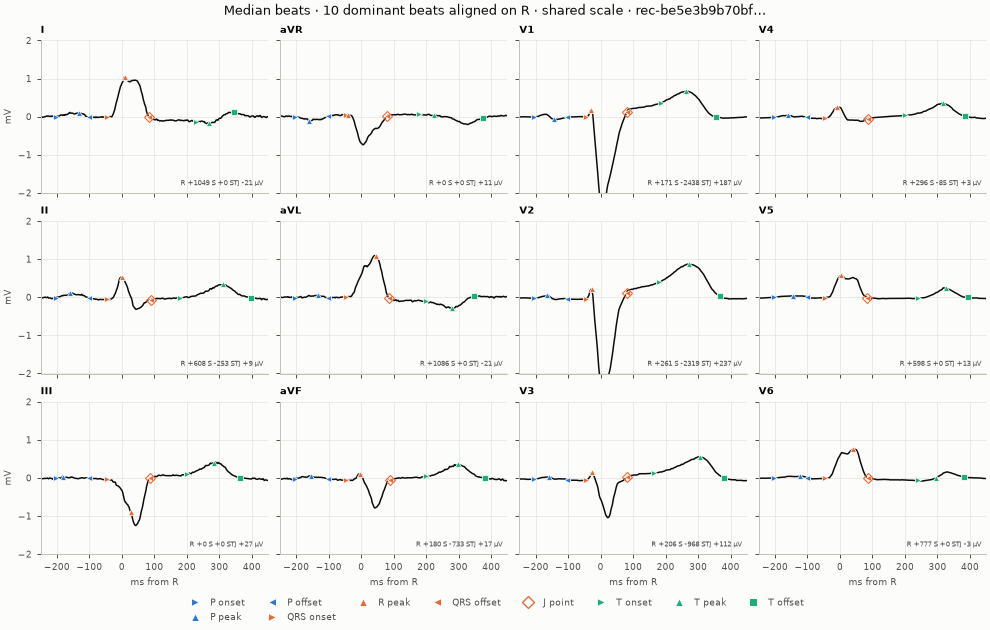
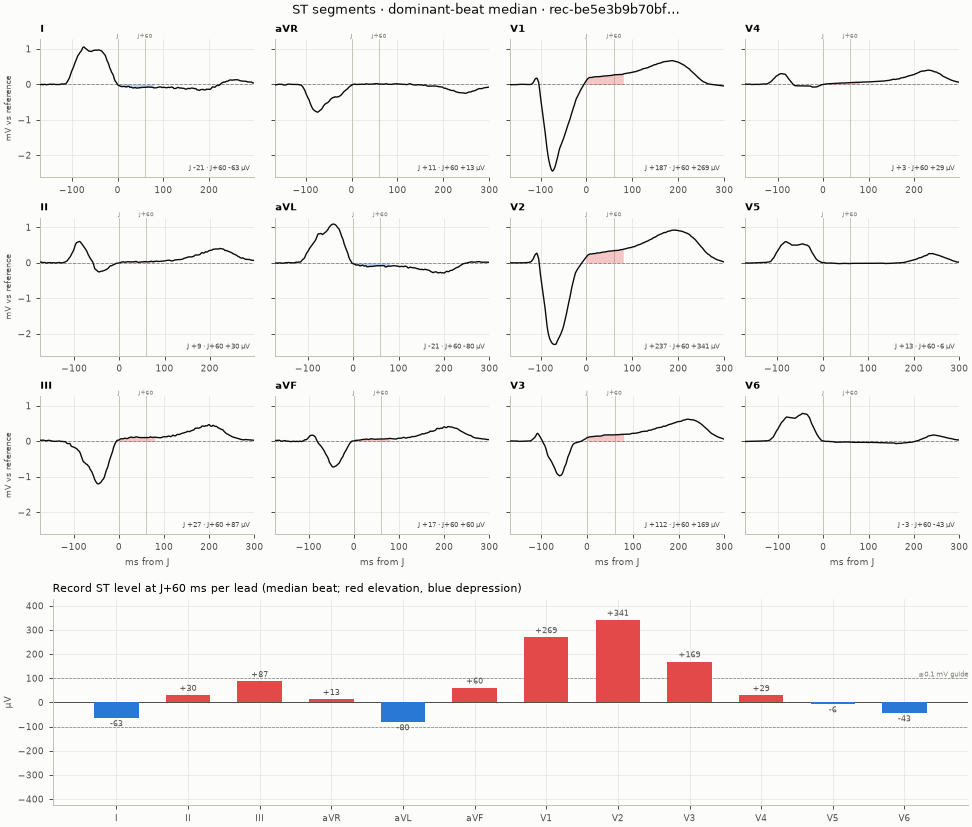
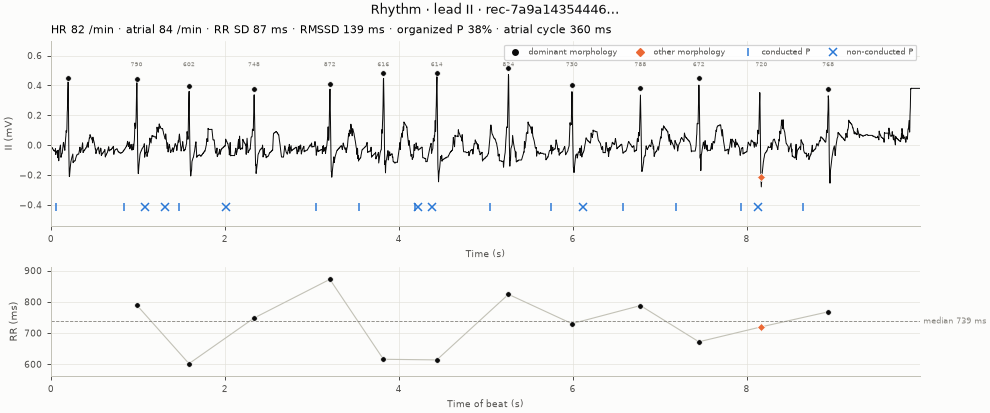
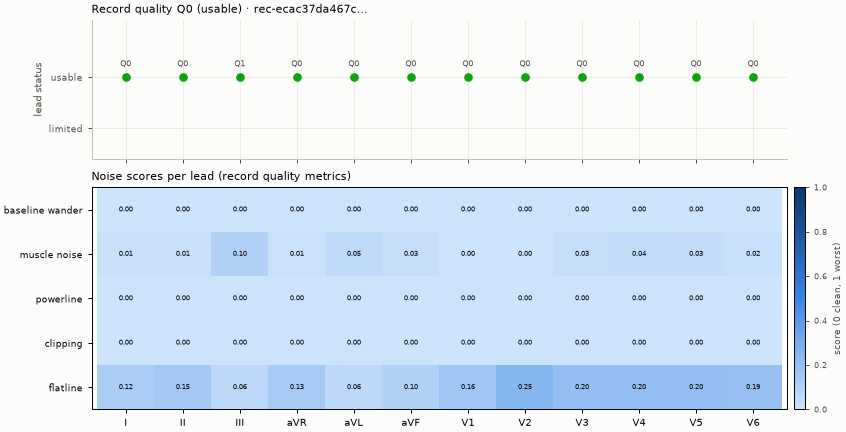
from ecgfeat.viz import plot_median_beats, plot_rhythm, plot_st_segments

fig, axes = plot_median_beats(example, paper_record)
fig, (panels, bars) = plot_st_segments(example, paper_record)
fig, (strip, rr) = plot_rhythm(example, paper_record, lead="II")
Styles and themes
from ecgfeat import viz

with viz.use_style("dark"):                     # or viz.set_style("dark") for the session
    fig, ax = viz.plot_ecg(example, paper_record)
custom = viz.PlotStyle().replace(ink="#203040", paper_major="#d08080", marker_size=5)
fig, axes = viz.plot_record(example, paper_record, leads=["II"], style=custom)
Web front-ends
viz.annotations_to_dict(record) needs neither Matplotlib nor the signal: it
returns JSON-ready beats, landmarks (samples and seconds), atrial events and
record-level values for a browser chart. viz.plot_record_interactive(signal,
record) builds a Plotly figure with hover read-outs.
data = viz.annotations_to_dict(paper_record, leads=["II"])
print(len(data["beats"]), list(data["landmarks"]["II"]))
Restyling
Every artist the package adds carries a gid starting with ecgfeat.viz:
(for example ecgfeat.viz:fiducial:r_peak), so you can find and restyle it:
import matplotlib
matplotlib.use("Agg")

import numpy as np
from ecgfeat import load_record
from ecgfeat.viz import plot_beat

record = load_record("ecg.record.json")
signal = np.load("ecg.npy")
fig, ax = plot_beat(signal, record, beat=0, lead="II")
for artist in ax.get_children():
    gid = artist.get_gid() or ""
    if gid.startswith("ecgfeat.viz:fiducial:"):
        artist.set_alpha(0.5)
Legacy plotting helpers
The pre-record helpers that plot legacy ECGFeatures objects (plot_beat,
plot_rep_beat, plot_beat_all_leads, plot_quality_summary) live unchanged
in ecgfeat.viz.legacy. The old import path ecgfeat.visualize and the
top-level ecgfeat.plot_* functions still work, but warn: they are removed no
earlier than 0.3.0. They use pyplot and are imported only when requested.
New code should use the (signal, record) functions above.